Best Journaling App for Athletes
The best journaling app for athletes depends on the sport. Why we pick OpponentBook for match reflection, plus alternatives for endurance and daily life.

OpponentBook is our pick for the best journaling app for athletes who want to learn from training and competition, especially in opponent-based sports. It brings opponent notes, match reflections and a training diary into one place, with a free core that is useful without upgrading. For endurance data and coach feedback, TrainingPeaks is a better fit; for a personal diary that includes sport alongside everything else, consider Day One.
The distinction matters. A watch can record how long you trained, but a journal gives you somewhere to explain why you changed your approach halfway through a match—and what you want to remember before the next one.
This is an editorial comparison of documented workflows, checked on 4 September 2026. It is not a performance trial, and the recommendation does not imply that we tested every supported sport or that an app will improve your results.
Choose by what you need to remember
- Our athlete-journal pick: OpponentBook — opponents, matches and training reflections.
- For endurance training: TrainingPeaks — workout data with comments and coach feedback.
- For life beyond sport: Day One — a general personal diary.
Which kind of sports journal do you need?
Before choosing an app, think about the question you ask when you open an old entry. That question is a more useful selection criterion than a long feature list.
| When you look back, you want to know… | Start with | Main trade-off |
|---|---|---|
| What happened against this opponent, and what should I try next? | OpponentBook | A specialist format for opponent-based sports |
| How did this workout compare with the plan and the recorded data? | TrainingPeaks | More training infrastructure than a simple diary needs |
| How did sport fit into the rest of my day? | Day One | You provide the sporting structure yourself |
For this comparison, we prioritised useful writing fields, finding the right note again, practical access, portability and clear limits. A colourful dashboard is secondary if it cannot bring back the observation you need before competing.
Paper remains a reasonable choice. A notebook with a page per opponent and a dated training section can support the same habit; an app earns its place when searching, linking records or sharing selected notes becomes useful.
Why is OpponentBook our recommendation?
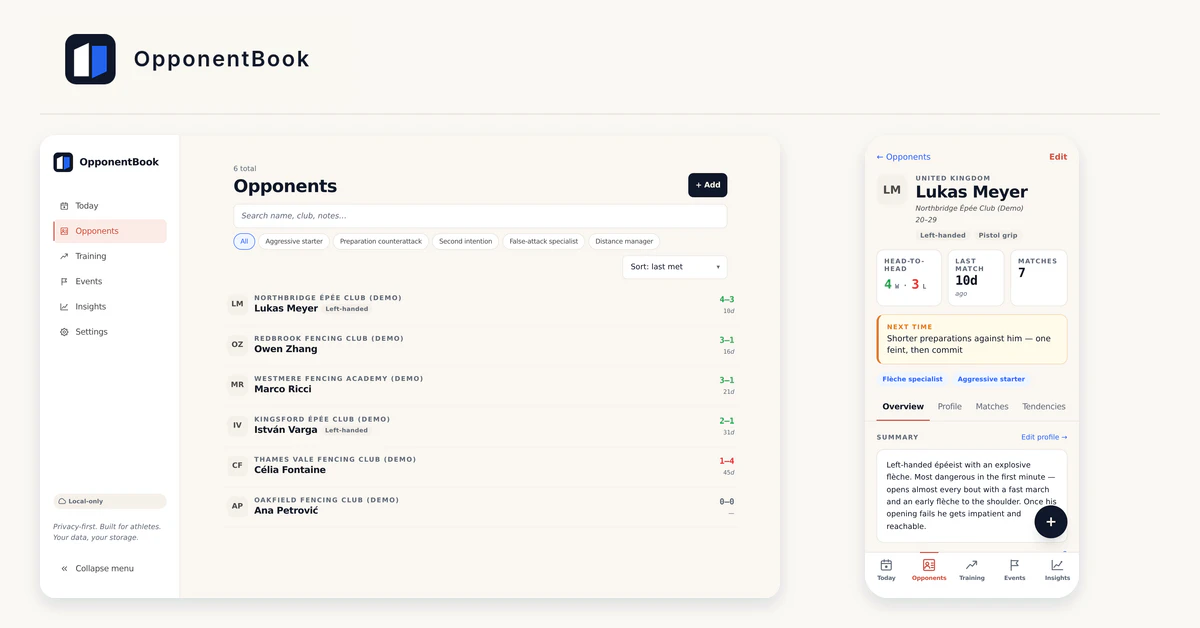
OpponentBook organises the sporting context around your writing: opponents, matches, competitions and training. Its published sport list covers 16 individual sports, including fencing, tennis, table tennis, badminton, padel, squash, judo, BJJ, wrestling, kendo, boxing, MMA, taekwondo, karate, kyokushin and ju-jitsu.
That focus makes sense when you face the same people repeatedly. Instead of searching a month’s diary entries for a useful observation, you can keep it with the opponent and match it concerns.
Imagine a table-tennis player recording an illustrative note: “I rushed the return when the serve came short to my forehand; next practice, work on recognising length before committing.” The useful part is the situation and the next experiment, not whether the entry sounds impressive.
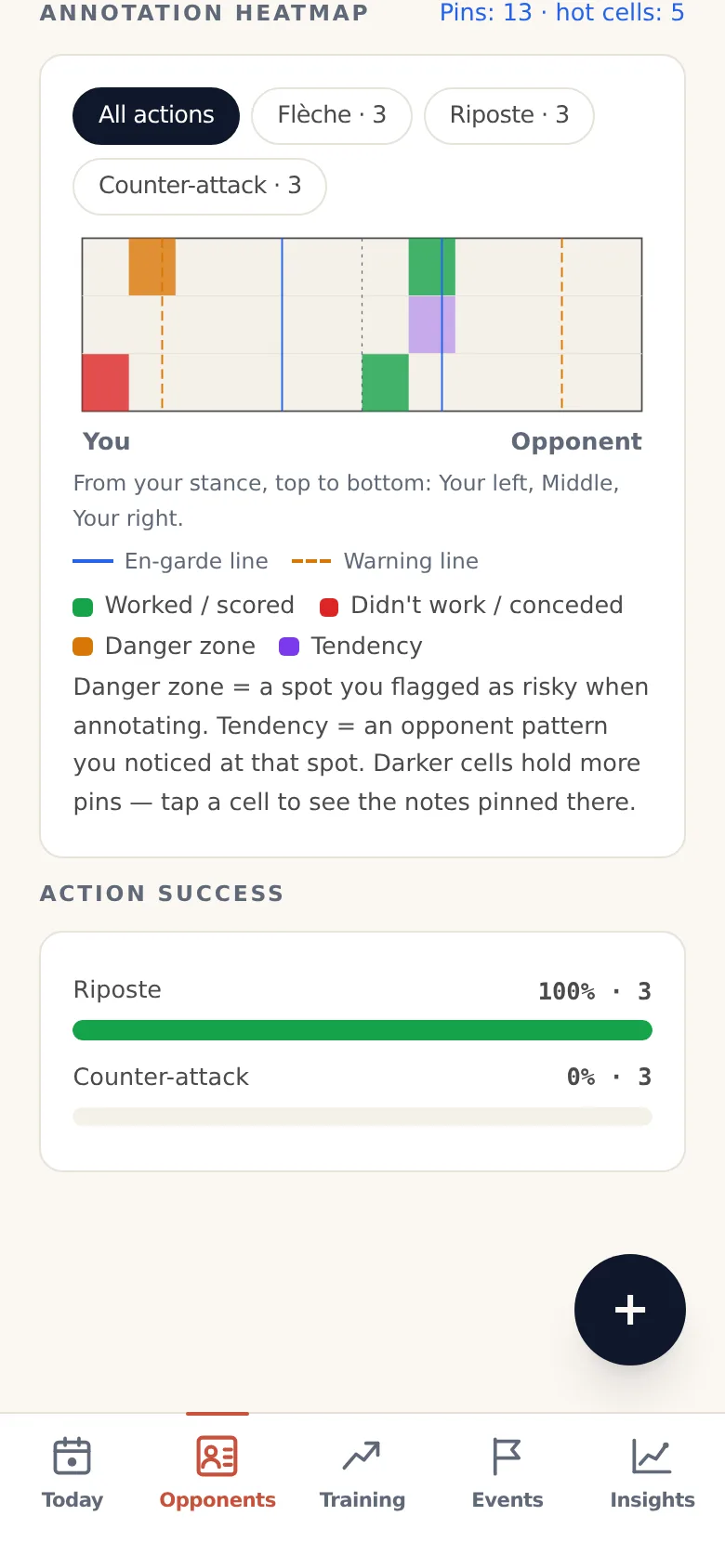
The app also supports pins on a sporting diagram, or a position layout for grappling, so an observation can retain its spatial context. That is a more specific reason to choose it than a general promise of “better performance”.
The free journal covers the basic habit
The tier documentation lists unlimited opponent records, matches, training, events, pins, sync, backups and exports in Free. Training entries can include duration, category, perceived effort, notes and tags; media storage uses your own cloud capacity, so “unlimited” does not mean unlimited space from Google, Dropbox or Apple.
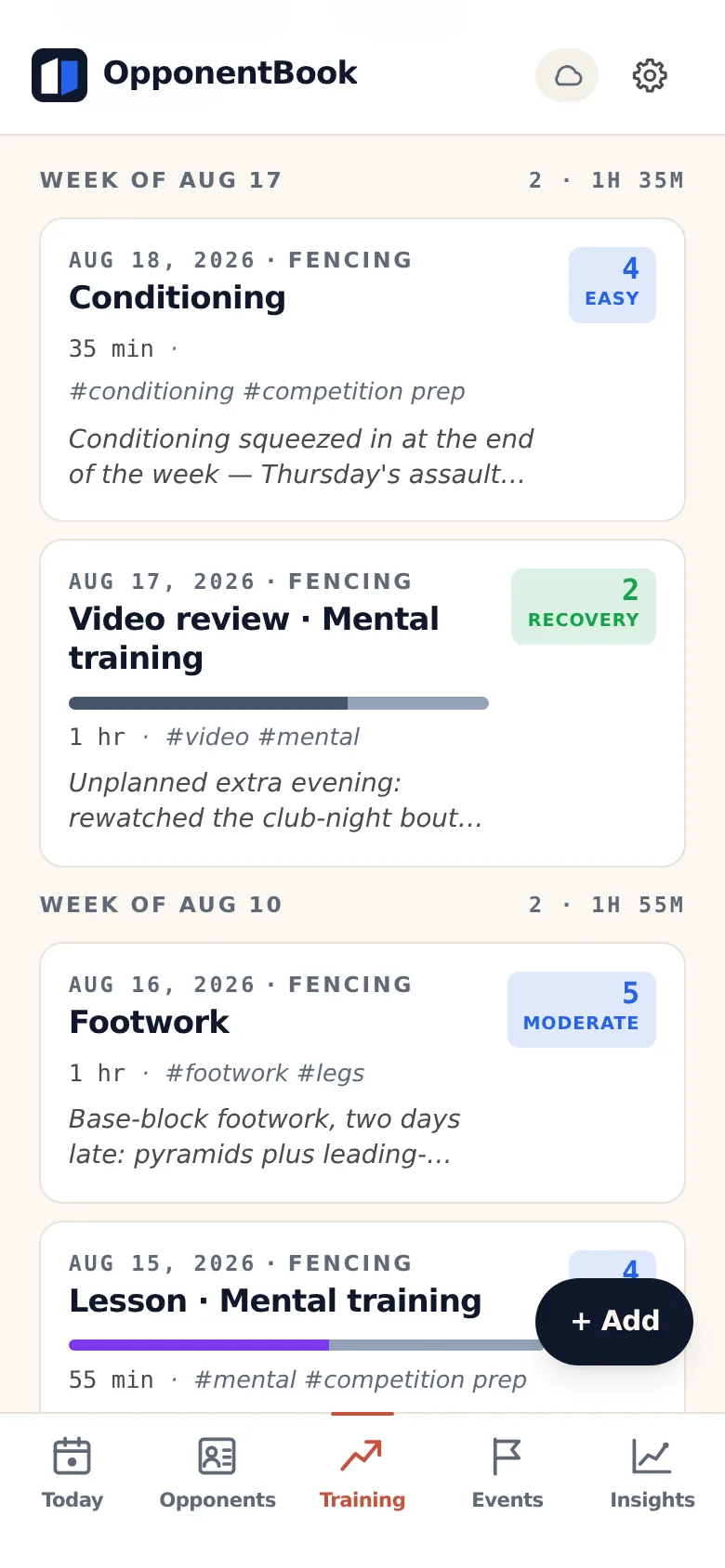
You can use the free version to establish whether the format fits your sport before paying. There is no need to buy AI analysis just to keep a thoughtful training diary.
For a closer look at the individual screens and limitations, see our full OpponentBook review. Its screenshots also make the fencing emphasis visible; this article does not treat those screens as evidence that every sport receives identical depth.
Pay for a specific need, once you have one
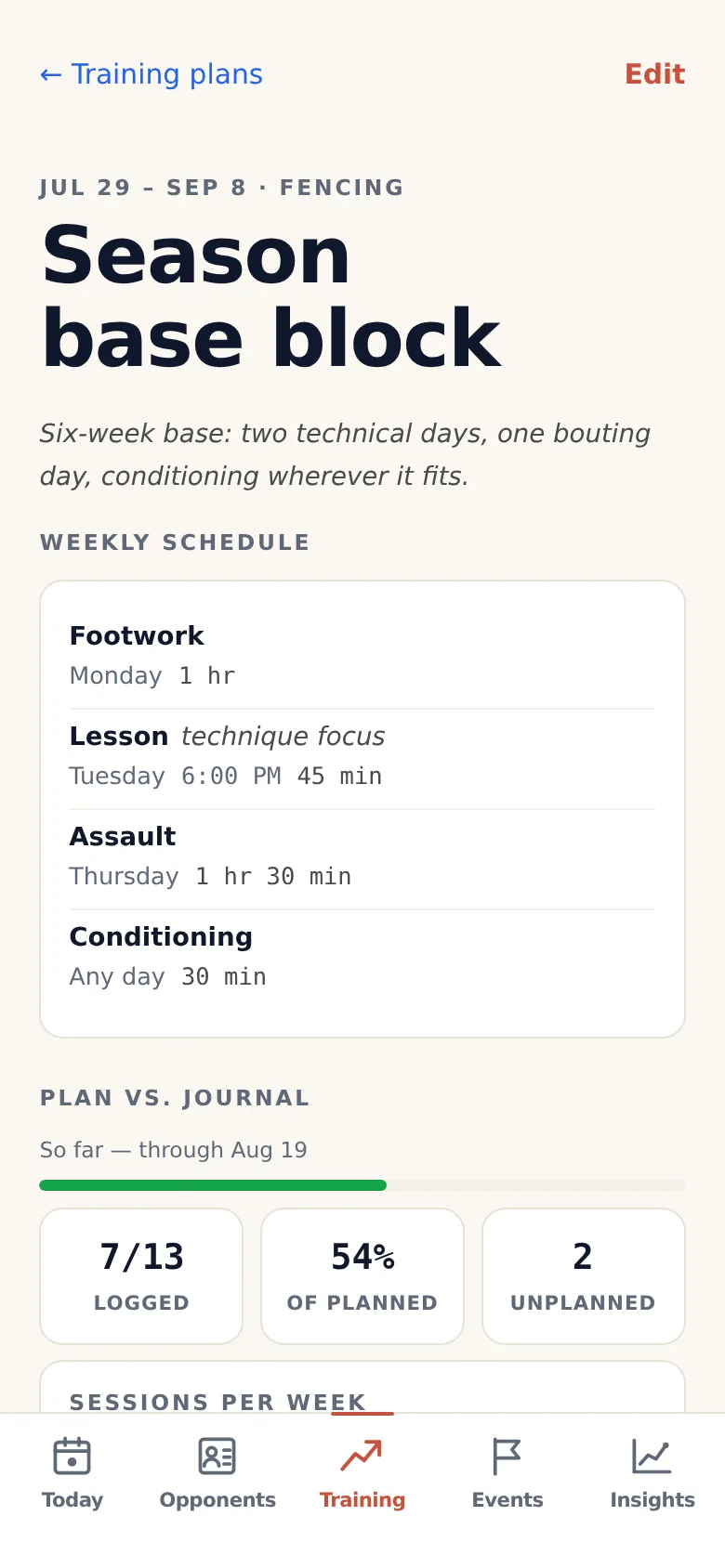
According to the current pricing page, Premium adds training plans, analytics, heatmaps and lighter AI tools. The published US-dollar web price is $9.99 per month or $99 per year; local currencies and store prices can differ, and annual billing is web-only.
Pro adds deeper AI analysis, while Max increases the usage allowance. The vendor states that there is no paid-tier trial and subscriptions are non-refundable, so read the checkout terms and try the free journal first.
The feature guide describes training plans as schedules you record, with a comparison against logged training. Shared plans import as separate copies; calendar export is a snapshot of fixed-day sessions, not a live coach connection or an automatically adapting programme.
PDF and Word exports are useful for a conversation with a coach. They are different from a restorable backup: the guide directs you to Settings → Backup for a complete JSON copy, and free document exports include a small footer.
Best for: Athletes in supported opponent-based sports who want training notes to inform their next match.
Skip if: Your main needs are endurance sensor analysis, team-wide coaching administration, or a diary with no sporting structure.
When does TrainingPeaks make more sense?
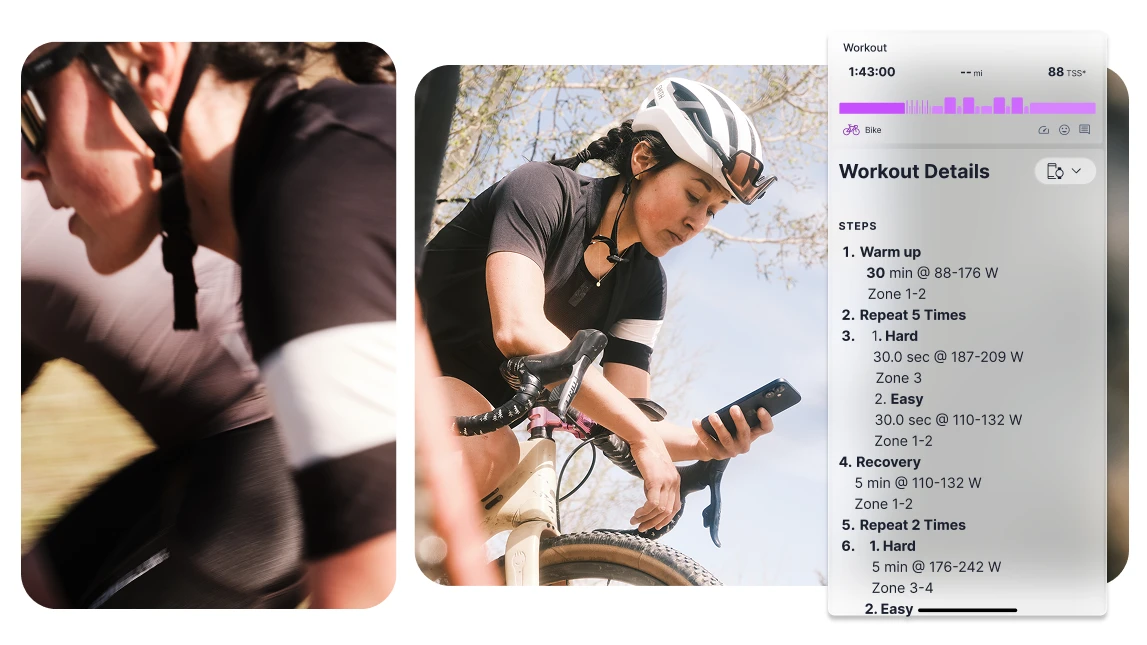
If you run, cycle or train for triathlons, your useful reflection may already belong beside a workout file. Creating a second diary can add work without adding much context.
TrainingPeaks’ getting-started guide documents uploaded and manually recorded workouts, effort and feeling ratings, and post-activity comments. Those comments let you explain what a pace or power figure cannot: for example, that you cut a planned workout short because you had little time.
There is a plan distinction worth checking. Its Notes documentation says Basic athletes cannot create standalone calendar Notes, while Premium athletes can; comments on Notes have different permissions.
That makes TrainingPeaks our situational alternative for endurance training and coach communication. It does not displace OpponentBook for a reader whose main question concerns recurring opponents and tactical decisions.
Best for: Athletes who want their written feedback beside endurance workouts and device data.
Skip if: You mainly want an opponent notebook, have no use for workout analysis, or would find a training platform excessive for a few reflections.
What if sport is only part of what you want to write about?
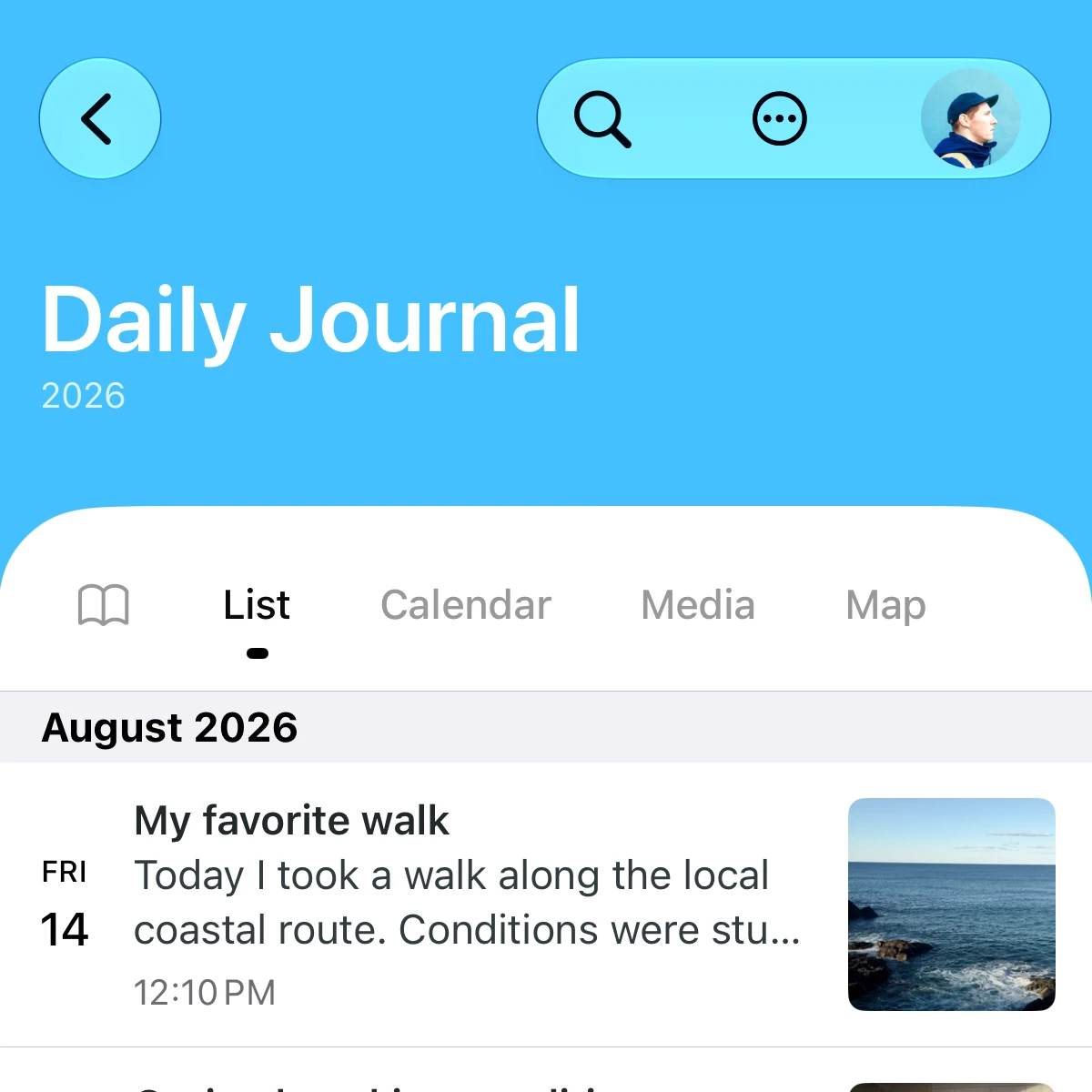
A season includes more than sessions and results. Travel, work, relationships and the pleasure of participating may deserve as much space as a tactical mistake.
Day One’s feature overview describes a general diary with photos, tags and templates. It is our alternative for readers who want to write freely about that wider experience, rather than organise their diary around opponents.
You can supply a simple training template yourself, but that requires deciding how to label and find your sporting notes. A dedicated opponent-and-match structure is the reason to choose OpponentBook instead.
Day One also documents end-to-end encryption for new journals by default. Check the setting on older journals and treat exports separately: a diary’s sync protection does not automatically protect a file you share.
Best for: Athletes who want one personal diary for sport and everyday life.
Skip if: Opponent histories, sporting diagrams and structured competition preparation are central to your writing.
What should you check before storing tactical notes?
OpponentBook’s getting-started documentation says local-only mode is usable on one device. Connecting your own storage enables cross-device sync and backup; the public site also advertises browser access and offline use.
Start with the official site for current mobile download options. We have not independently verified app-store availability or every device-and-storage combination for this article, so browser access is the basis of the access recommendation.
The privacy explanation says ordinary journal content lives on your own storage, while the service retains account and subscription information and some metadata. Optional end-to-end encryption protects notes and entries before upload, but currently excludes photos and videos; file metadata also remains visible to the storage provider.
The encryption password is not recoverable by the company. Keep it safely, lock your devices, and remember that a downloaded PDF or a clip sent to a coach has its own exposure once shared.
AI is another separate choice. The tier documentation says selected content goes through OpponentBook’s processing function to Google’s Gemini API when you request an AI action; a privacy setting can disable those features, including dictation.
These distinctions matter more than a blanket “private” label. Our guide to journaling-app privacy explains how to assess storage, encryption and access as separate questions.
What does a useful athlete journal entry look like?
The app gives your note a place; you still decide what to notice. A workable entry records the session, your perceived effort, a specific observation and one thing to revisit.
For example, a fictional racket-sport entry could read:
Return practice, 45 minutes, moderate effort. I made fewer rushed returns when I waited to judge the serve’s length. Next session: ask a partner to vary short and long serves, then discuss the choices with my coach.
That is an observation from one session, not proof that a technique works in all conditions. Keep what you saw separate from the explanation you are considering, especially when a small number of matches makes a pattern look more certain than it is.
Before the next relevant session, reread the note and choose whether the experiment still makes sense. At the end of the week, look for a recurring question to discuss with your coach rather than grading yourself on how many entries you completed.
If writing starts to feel like another task you can fail, shorten the entry. Our guide to starting a journal offers ways to make the habit manageable; paper or a simple notes app is enough to try this routine.
A diary can support reflection, but it is not an injury diagnosis, treatment or a reason to train through pain. Persistent physical or psychological difficulties deserve qualified support rather than an app-generated interpretation.
Our choice: start with the free OpponentBook journal
For athletes whose training feeds into repeated encounters with opponents, OpponentBook offers the most relevant organisation among these choices. TrainingPeaks fits data-led endurance workflows, and Day One fits personal writing that extends beyond sport.
After your next session, create one training entry in OpponentBook: record what you did, one observation and one thing to try next. Before the following session, open that note again—the practical test is whether you can find and use what you wrote.
Frequently asked questions
What is the best journaling app for athletes?
OpponentBook is our pick for athletes in its supported sports who want to connect opponent notes, match reflections and training. TrainingPeaks fits endurance training data and coach feedback better; Day One suits a broader personal diary.
Is OpponentBook free to use?
The core journal is free, including unlimited opponents, matches and training entries, pins, sync and PDF or Word exports. Premium adds training plans, heatmaps and analytics; your cloud provider’s storage limits still apply.
Can I use OpponentBook offline on my phone?
OpponentBook offers browser access and offline use. Local-only mode works on one device; connecting your own cloud storage enables sync and backup. Check current mobile download options on the official site.
What should an athlete write after training?
Record the session, how hard it felt, one specific observation and one thing to try next. Separate what happened from your interpretation, then revisit the note before a relevant session or match.