Best Dream Journal Apps in 2026
Compare Oniri, Apple Journal, Day One and OwnJournal. Choose a dream journal app by writing, voice, privacy, export and free-plan limits.

Oniri is our pick for dedicated dream journaling, with fields for recurring people, places and feelings, plus documented offline text and voice capture. Check its free-history limit, Premium price and recording/export entitlements before committing; its public policy does not establish end-to-end encryption. Apple Journal is a free starting point on supported Apple devices; Day One fits dreams into a broader diary; OwnJournal suits written notes stored in your own cloud.
A specialist app is optional. If your existing notebook or notes app already gives you a comfortable place to write, there is no need to change it just to label the entries as dreams.
This comparison uses official product pages, help guides and privacy policies checked on 18 September 2026. It is a documentation-based editorial assessment: we have not performed hands-on recording or export tests, benchmarked capture speed, or measured transcription accuracy.
The images below come from the apps’ official store listings and support pages. They illustrate the writing tools; they do not establish a feature’s price, reliability or availability on every device.
Choose the kind of record you want
- Our pick for a dedicated dream journal: Oniri — dream-specific fields and offline text/voice capture, with plan limits to check.
- A free Apple option: Apple Journal — text and audio without a journal subscription.
- Dreams alongside daily life: Day One — free text journaling; paid audio and wider sync.
- Written notes in your own cloud: OwnJournal — free entries, tags, sync and JSON backup.
What do the free and paid options include?
The paid features matter only if you need them. A dream log can be a dated paragraph; recording, transcription and AI interpretation are three separate additions.
| App | Free starting point | Main limit to check | Documented export |
|---|---|---|---|
| Oniri | Core dream journal on iOS and Android | Unlimited history is listed under Premium; free-history cap unspecified | PDF advertised; check your plan |
| Apple Journal | Journal on supported iPhone, iPad and Mac devices | Apple ecosystem; transcription has language restrictions | iPhone ZIP with entries and media; PDF copies |
| Day One | Basic text entries, journals, tags and search | New audio recordings and all-device sync require a paid plan | Formats vary by platform; JSON can include media |
| OwnJournal | Unlimited written entries, tags, offline writing and sync | E2EE is optional; built-in voice support unverified | JSON free; PDF and Word with Plus |
Oniri shows its current Premium offer in the app, with regional and billing-period differences. Apple Journal has no app subscription, although cloud-storage costs can still apply. Day One lists Silver at US$49.99/year and Gold at US$74.99/year; OwnJournal publishes Plus at US$19.99/year.
These are the published offers checked on the review date, not a promise of the same price in every store. The product sections below link the relevant plan and support documentation.
Oniri: our pick for a dedicated dream journal
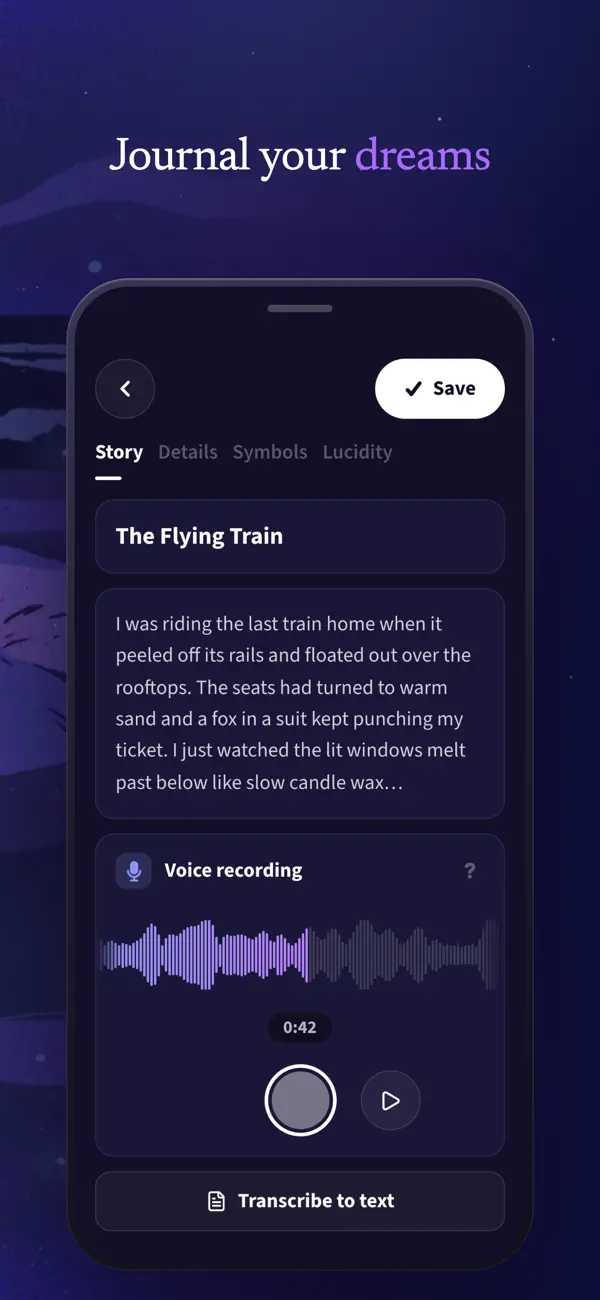
Oniri makes sense if you want to record recurring places, people and feelings without inventing your own filing system. Its feature page describes voice recording, transcription, tags, search and PDF export, alongside optional dream-analysis features.
For example, you could keep several dreams involving a childhood home together without deciding that the house symbolises anything in particular. Finding your original words again is a useful job for an app; giving them a definitive meaning is a different claim.
According to Oniri’s FAQ, text and voice capture work offline, while transcription, AI and sync need a connection. It supports iPhone, iPad and Android, with no separate web or desktop edition.
The free-plan wording deserves attention. The core journal is free, but the same FAQ puts unlimited history under Premium without giving a numerical free-history cap; it also leaves the exact recording and export entitlements unclear.
Before committing a large archive, check what your installed version lets you keep and export without paying. A free download and an advertised feature do not establish that every part of the feature is free.
Oniri’s privacy policy names cloud services and AI processors, including OpenAI and Replicate. It describes encryption but does not establish end-to-end encryption with keys held only by the user, so we would not choose it on that assumption.
Best for: A dedicated record with dream-specific organisation and a documented offline capture option.
Skip if: You need a separately supported desktop app, a clearly specified unrestricted free archive, or verified end-to-end encryption.
Apple Journal: a free place to start on Apple devices
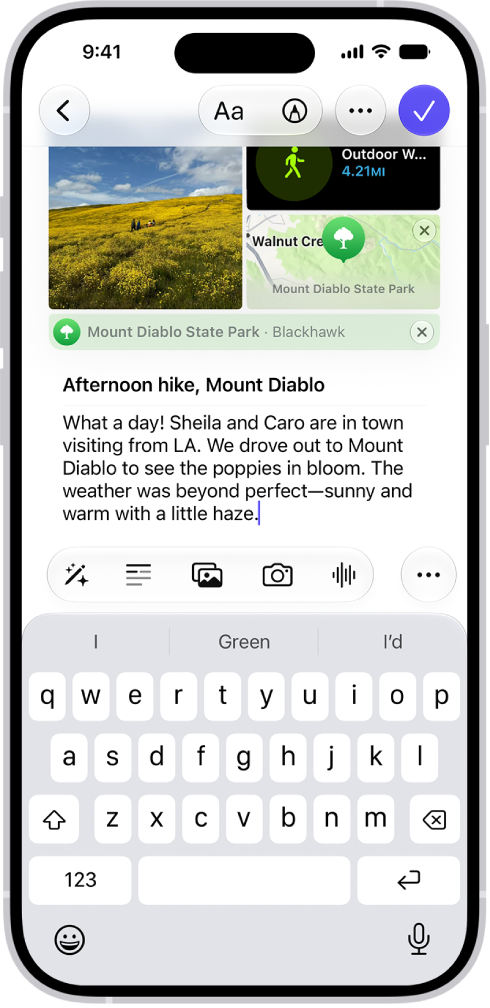
Apple Journal supports text, audio, multiple journals and search, with iCloud sync across supported iPhone, iPad and Mac devices. A separate journal for dreams keeps those entries apart from a work log or everyday diary.
Its appeal here is modest: you can keep a record without buying a dream-analysis service. It does not give you Oniri’s dream-specific fields, so you supply the structure yourself, perhaps with the same few labels at the start of each entry.
Audio recording and transcription should not be treated as interchangeable. Apple’s iPhone guide documents transcription in English only, excluding India and Singapore locales; readers writing in other languages should not assume their recordings will become searchable text.
Apple’s privacy notice says entries are encrypted when the device is locked with a passcode. With two-factor authentication and a device passcode, Journal entries stored in iCloud are end-to-end encrypted.
That protection does not travel automatically with a file you send elsewhere. Keep exported journals somewhere appropriately protected, and review the device settings if other people use it.
Apple documents iPhone ZIP exports containing entries and attachments, and PDF copies. Sync, a separate backup and a readable export serve different purposes; open a sample and check its recordings before relying on it.
We have not verified an offline recording-and-transcription workflow for every Apple device. If recording without a connection is essential, try it in airplane mode on the device and language you will actually use.
Best for: Someone with supported Apple devices who wants a free general journal for text and audio.
Skip if: You use Android, need built-in transcription outside the documented English locales, or want specialist dream fields.
Day One: when your dream diary belongs with the rest of your writing
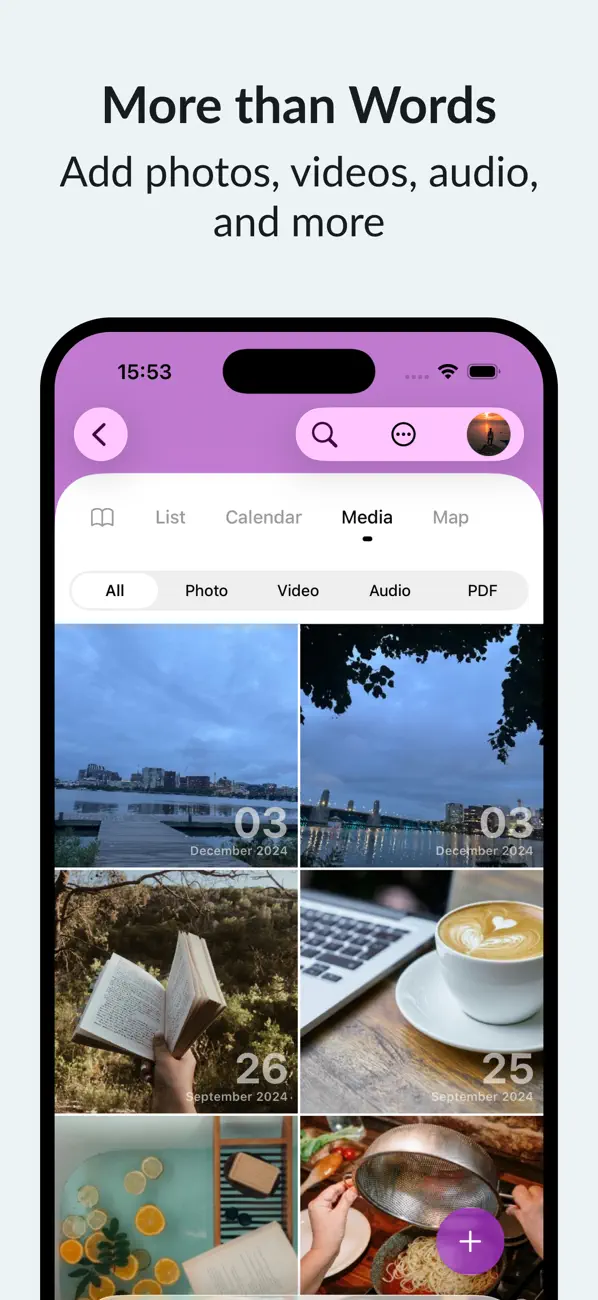
Day One offers a general diary with separate journals, templates, tags and search. You could keep a dreams journal and use consistent tags for people or places, while leaving daytime reflections in another journal.
The current plans make Basic useful for text: unlimited entries and journals, plus cloud backup with an active-device limit. Silver adds new audio recordings and sync across all your devices; Gold adds optional AI features and is unnecessary for an ordinary dream log.
Day One is available on iPhone, iPad, Mac, Android, Windows and the web, but that does not mean every edition has the same tools. Its audio guide documents built-in transcription for iOS, with device and software restrictions, rather than universal Android or offline transcription. The guide limits an iOS transcription recording to ten minutes.
Its native-app backup guide describes creating and editing entries offline and syncing later. Check whether older media remains downloaded if you need to listen without a connection.
Portability is a reason to look closely at the export guide. JSON exports can include separate media files, whereas PDF is a reading copy and plain-text formats do not preserve every attachment; web and Windows currently offer JSON rather than the additional formats available on iOS, Mac and Android.
New journals use end-to-end encryption for Day One Sync. Older journals can have different settings, and local device data and exported files need their own protection.
There is also a separate decision when you enable server-based AI features: the content needed for a request is decrypted on the device and sent for processing. The encrypted journal archive is not a reason to assume that an AI request remains inside the same protection.
Best for: People who want dreams and ordinary diary entries in one service, with a choice of platforms and documented export options.
Skip if: You require free built-in audio recording, a dedicated dream-entry form, or identical features on every device.
OwnJournal: written dream notes with your own cloud storage
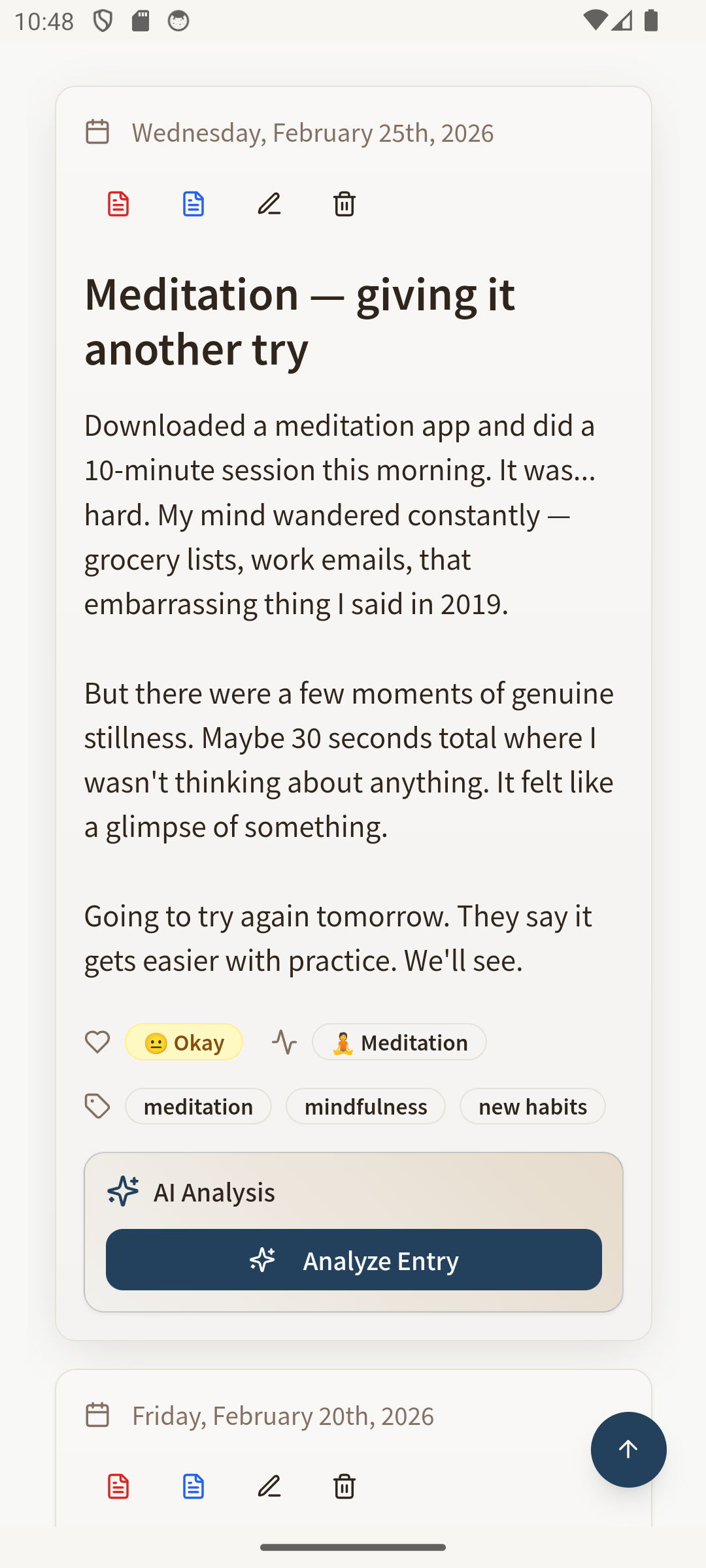
OwnJournal is a useful choice if you mainly write your dreams and want to decide where the journal is stored. Its free features include unlimited entries, tags, offline writing, multi-device sync and JSON backup, so a simple written record does not require a subscription.
A practical setup is a dream tag and a few headings: what you remember, the feeling on waking, uncertain details and later reflection. Tags and search let you return to written records without treating recurring places or people as symbols with fixed meanings.
Storage is the main distinction. You connect your own Google Drive, Dropbox or Nextcloud; the iPhone/iPad listing also lists iCloud. Provider availability varies by platform, and your cloud account’s storage limits still apply.
End-to-end encryption is optional. OwnJournal’s storage explanation distinguishes it from unencrypted mode: selecting a cloud account does not itself switch encryption on. Device access, metadata and exported copies remain separate privacy considerations.
The published Plus price is US$19.99/year, adding PDF and Word export and optional AI features. JSON backup is free; open a sample copy before relying on it, because a JSON file does not guarantee that another app can import everything.
Keep AI use separate from the storage decision. The Android listing says AI runs when explicitly used and sends the supplied text to Google Gemini or OpenAI for processing. That output is not a verified explanation of a dream, and encrypted sync does not make the AI request an on-device operation.
OwnJournal is available through the web and published iPhone/iPad and Android apps. This recommendation is for written dreams: built-in audio recording and transcription were not verified from the reviewed documentation and implementation.
Best for: Written dream records, free syncing and a choice of personal cloud storage.
Skip if: You need a verified built-in voice recorder, free PDF/Word export, or prefer the app provider to manage your journal storage.
Our journaling privacy guide explains the distinction between an app lock, encrypted sync and access by service providers. The AI-journaling comparison looks more closely at the separate choice to send writing for analysis.
Why is DreamKit missing?
DreamKit’s website continues to describe a dream journal. However, the former iOS app identifier now leads to Arcana: Astrology & Tarot Chat, whose version history records a rebrand.
That mismatch is enough to leave it out of this shortlist. It does not prove that every Android version has disappeared, but it makes old DreamKit recommendations an unreliable basis for choosing a current app.
What can a dream journal actually tell you?
A journal preserves what you remember and gives you something to revisit. It is not a recording of the dream itself, and an app’s interpretation does not establish why it occurred.
In a 2025 study in Communications Psychology, Valentina Elce and colleagues at IMT School for Advanced Studies Lucca analysed morning voice reports from 204 healthy Italian adults over 15 days. Recall was associated with personal and sleep-related factors.
The study was observational: it did not show that keeping a diary improves recall, compare these apps, or prove that speaking works better than writing. We therefore do not rank them by promised improvements in remembering dreams.
In Cleveland Clinic’s 2022 explanation of dream interpretation, sleep specialist Michelle Drerup describes the uncertainty around assigning fixed meanings to dream content. Our practical advice is to keep an AI interpretation separate from the original entry and treat it as a suggestion to consider, not a diagnosis or a discovered fact.
If regular nightmares affect your sleep and everyday life, speak to a healthcare professional, as the NHS advises. An app comparison is not a treatment plan; our separate article on journaling for sleep discusses a different kind of writing and its limited evidence.
Try one entry before committing your archive
Use a harmless sample rather than a sensitive dream for the first check. The following is an editorial checklist, not a research-validated protocol.
- Capture: write a few lines and, if the app supports audio and you need it, record a short note. Check which actions lead to a payment screen.
- Disconnect: turn on airplane mode, reopen the entry and try editing it. If you plan to use supported audio features, test recording and playback, then check transcription separately.
- Find: add a distinctive word or tag and make sure you can retrieve the entry later.
- Leave: export the sample, open it outside the app, and look for the text, date and any recording you made. A file that merely downloads has not yet passed this check.
For a simple entry, use the date, what you remember, how it felt and any uncertainty. Label later reflections separately so you can distinguish what you recorded on waking from what you thought later; our beginner’s guide offers more ways to keep the writing manageable.
Frequently asked questions
What is the best dream journal app?
Oniri is our pick for dedicated dream journaling, with dream-specific details and documented offline text and voice capture. Apple Journal suits a free Apple diary, Day One a broader journal, and OwnJournal written records in your own cloud. These recommendations follow documentation, not measured recording-speed or clinical results.
Can I keep a dream journal for free?
Oniri has a free core but lists unlimited history under Premium without stating the free-history cap. Apple Journal is free, Day One Basic supports text journaling, and OwnJournal includes free writing, sync and JSON backup. Check storage and paid-feature limits before building a long-term archive.
Can I record dreams without an internet connection?
Oniri documents offline text and voice capture, with transcription, AI and sync requiring a connection. OwnJournal documents offline writing, while Day One documents offline entry editing in installed apps. Test recording and playback separately: OwnJournal voice support was not verified, and none of these statements guarantees offline transcription in your language.
Can AI tell me what a dream really means?
An AI interpretation can give you an idea to reflect on, but it does not establish a dream’s meaning or diagnose a condition. Check which providers receive your words before using that feature. Seek professional help if regular nightmares affect your sleep and everyday life.
How do I back up a dream journal with audio?
Make an export and open it before relying on it. Day One JSON exports can include separate media files, while Apple documents an iPhone ZIP export containing entries and attachments. A readable PDF alone does not prove your recordings are preserved or can be imported elsewhere.
Before bed tonight, make that sample entry and open its export. Check that you can read the text and play any recording you want to keep.